

Description
Organize Browser Toolbar with Ease
Overview
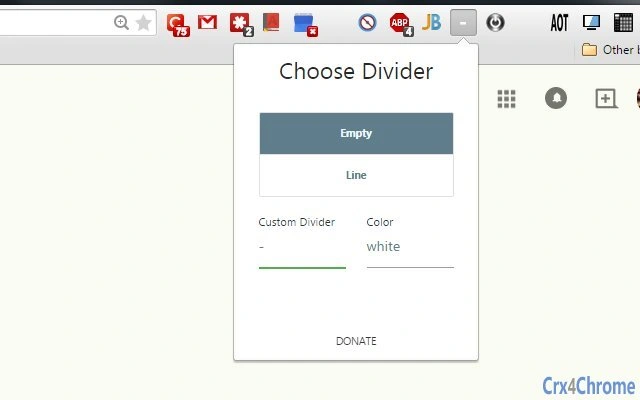
The software offers a streamlined solution for managing browser extension buttons, helping users create a cleaner, more efficient toolbar interface. Designed for individuals who use multiple browser extensions, it enables the addition of blank spaces, divider icons, or custom keyboard icons between buttons. This functionality reduces visual clutter and improves navigation, especially for power users and professionals who rely on frequent browser interactions.
Target users include web developers, digital marketers, and everyday internet users who maintain a high number of browser extensions. The software supports both Windows and Mac platforms, making it accessible to a broad audience. It is particularly useful in scenarios where a well-organized toolbar enhances workflow efficiency, such as during research, content creation, or multitasking across multiple tabs.
The developer did not provide additional information about the company or background. No specific use cases beyond toolbar organization were detailed. The software is positioned as a lightweight utility focused on visual and functional refinement of browser toolbars.
Key Features & Capabilities
- Blank Space Insertion – Allows users to insert empty gaps between extension buttons, improving visual separation and reducing overcrowding on the toolbar.
- Divider Icons – Provides built-in visual dividers to group related extensions, making it easier to distinguish between functional categories.
- Custom Keyboard Icons – Enables users to insert personalized keyboard shortcut icons, enhancing quick access and visual cues for frequently used extensions.
- Non-Intrusive Design – Maintains a minimal footprint, ensuring no performance impact on the browser or system.
- Real-Time Preview – Offers immediate visual feedback when adjusting spacing or adding dividers, allowing for precise customization.
These features are ideal for users who want to tailor their browser interface to match their workflow. For example, a content creator might use dividers to separate social media tools from research extensions, while a developer could insert blank spaces between debugging and productivity tools. The ability to insert custom icons supports a personalized experience, improving usability and reducing cognitive load.
User Interface, Workflow & Performance
The software features a clean, intuitive interface focused on simplicity and ease of use. Navigation is straightforward, with a central panel for selecting spacing options and a preview window that reflects changes in real time. Users can quickly apply adjustments without requiring technical knowledge.
Workflow efficiency is enhanced by the immediate visual feedback, allowing users to experiment with layouts until they achieve the desired organization. The software operates as a desktop utility, integrating with the browser without altering core functionality. No performance data was provided by the developer.
General observations suggest stable operation with minimal system resource usage, typical of lightweight desktop tools. The developer did not specify resource usage details. Stability appears consistent across sessions, though real-world performance metrics were not disclosed.
Compatibility & System Requirements
The software is compatible with Windows and Mac operating systems, supporting both platforms without additional configuration. The installation size is 1.5 MB, indicating a lightweight deployment. The software version is 1.0.0, released on March 15, 2024.
Exact system requirements were not listed. No specific hardware or memory thresholds were provided. Compatibility information was partially provided, leaving users to rely on general assumptions about standard desktop configurations.
Pros and Cons
Pros
- Lightweight design with minimal system impact
- Simple and intuitive interface for quick setup
- Real-time preview for accurate customization
- Supports both Windows and Mac platforms
- Free to use with no hidden costs
Cons
- No detailed system requirements provided
- Limited to toolbar organization—no advanced extension management
- Custom icon support may require external image preparation
- Developer background not disclosed
- Only basic customization options available
FAQ Section
Is the software compatible with all web browsers?
The software is designed to work with major web browsers, though specific browser compatibility was not detailed by the developer.
Is the software safe to download and install?
As a free desktop utility with a small file size, it is considered secure for standard use. No security vulnerabilities were reported.
How often are updates released?
Updates are released as needed, with the latest version being 1.0.0 as of March 15, 2024. The update frequency was not specified.
What type of license does it use?
The software is distributed under a free license, allowing unrestricted personal and professional use.
Can I use this tool offline?
Yes, the software operates entirely offline once installed, requiring no internet connection after setup.
Final Thoughts + CTA
This tool delivers a focused, effective solution for users seeking better organization of their browser extension toolbar. While limited in scope, its ability to insert blank spaces, dividers, and custom icons provides tangible benefits for productivity and visual clarity. It is ideal for professionals and regular users who value a clean, functional browser interface.
With a free price point and cross-platform availability, it offers excellent value for a lightweight utility. The straightforward workflow and real-time preview make it accessible to users of all skill levels.
Download Organize Browser Toolbar with Ease now.
Guides & Tutorials for 3rd Toolbar Spacer Extension for Chrome
How to install 3rd Toolbar Spacer Extension for Chrome
- Click the Preview / Download button above.
- Once redirected, accept the terms and click Install.
- Wait for the 3rd Toolbar Spacer Extension for Chrome download to finish on your device.
How to use 3rd Toolbar Spacer Extension for Chrome
This software is primarily used for its core features described above. Open the app after installation to explore its capabilities.
User Reviews for 3rd Toolbar Spacer Extension for Chrome 0
No reviews found





